 Magstripe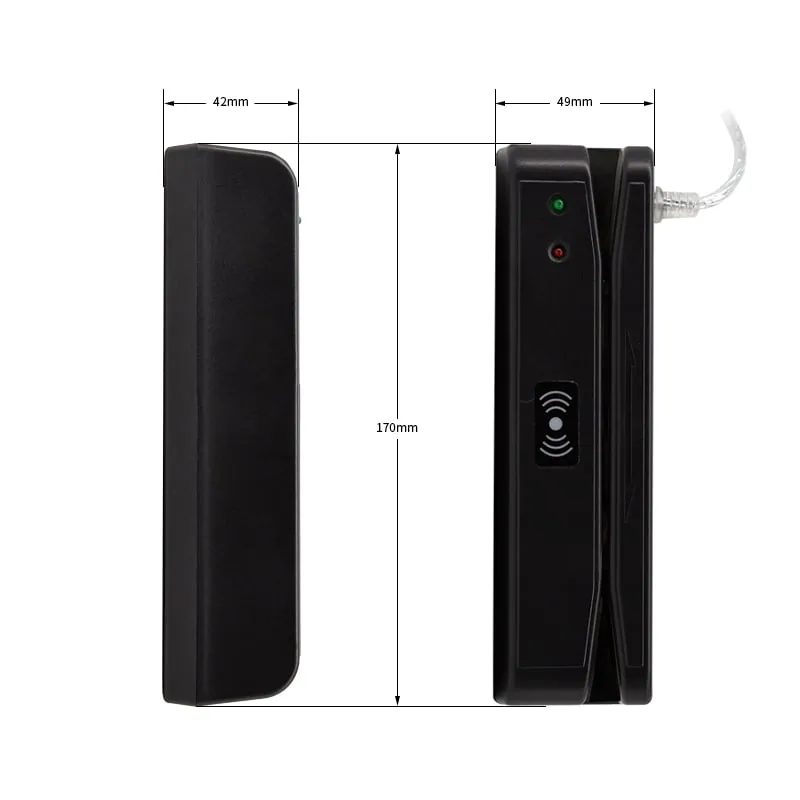
Magnetic Stripe Card Readers
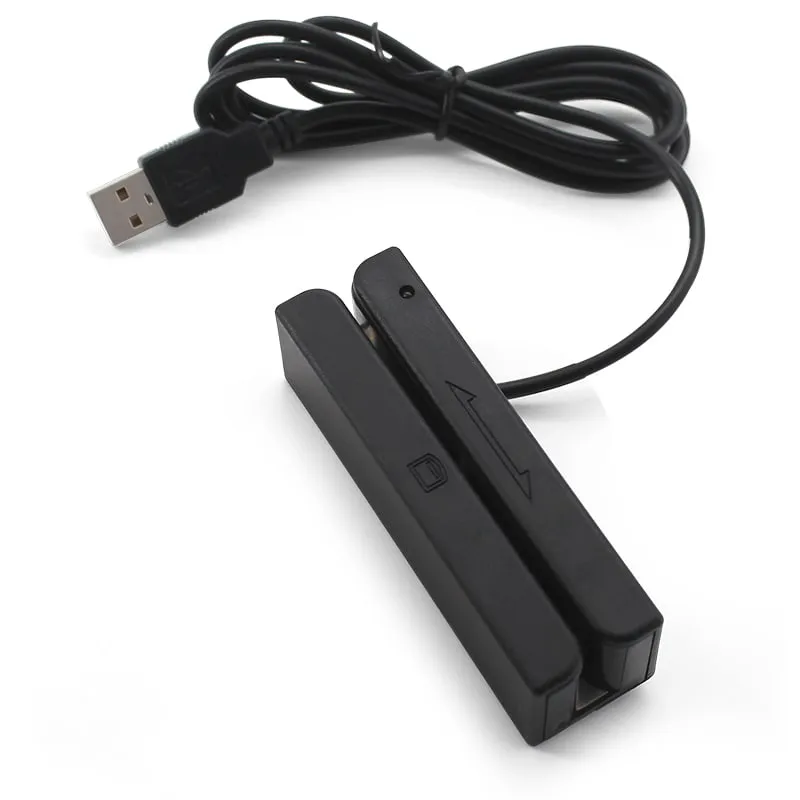
M180-U USB Track 2 Magnetic Stripe Card Reader (Long Body)
The M180-U is a long-body USB swipe reader for the Track 2 data on magnetic stripe cards, for counters and front desks that read membership, loyalty or staff ID numbers. It accepts swipes in either direction at up to 120 cm/s, draws ≤ 35 mA and has a rated head life of 600,000 passes.
- Cards / tags
- Magnetic stripe cards, PVC 0.76 ± 0.08 mm
- Interface
- USB
- ✓ Sample units for evaluation
- ✓ Output format confirmed for your software
- ✓ Private label & OEM options
- ✓ Reply within 1 business day
Why integrators choose the M180-U
- Track 2 only — reads the numeric track that many membership, loyalty and staff ID programs use for the card number.
- Long, heavy body — 170 × 42 × 49 mm and 167.2 g net, sized for reception counters and front desks.
- Two-way swipe — accepts cards in either direction at up to 120 cm/s, with F2F (FM) decoding.
- Clear status feedback — a red power LED, a green status LED and a built-in buzzer; LED and buzzer are controllable.
- Low power — 5 V DC ± 5 % at ≤ 35 mA over a 1350 mm USB cable.
When Track 2 is all you need
Track 2 is the numeric track of a magnetic stripe: up to 40 characters at 75 bpi. Many membership, loyalty, library and staff ID programs store the card or account number there and leave Track 1 and Track 3 empty or unused. If that describes your cards, the M180-U reads everything your software needs.
It does not read Track 1 (letters and digits, often a name) or Track 3. If your system needs either, or you are not sure how your cards are encoded, choose the M170-U 3-track reader, or send us one or two sample cards and we will check them before you order. Magnetic stripe tracks 1, 2 and 3 explained covers the formats in more detail.
Housing and counter use
At 170 × 42 × 49 mm and 167.2 g net, the M180-U is about twice the weight of the compact M170-U. The long slot guides the card past the head, and the extra weight helps the reader stay in place when staff swipe quickly at a reception desk or service window. Rated head life is 600,000 passes.
A red LED shows power and a green LED shows reader status, with a built-in buzzer alongside. The 0 °C to +45 °C operating range and 10–90 % RH rating make it an indoor desk reader.
Output and host setup
The M180-U connects by USB and draws ≤ 35 mA at 5 V DC ± 5 %. Its specification lists Windows (XP, Vista, 7, 10), Linux and Android hosts. Tell us in your RFQ how your application expects the Track 2 data — for example as typed keyboard input with or without an Enter after each swipe — and we confirm the output configuration in your quotation.
M180-U specifications
| Model | M180-U |
|---|---|
| Reader type | Magnetic stripe swipe reader, read-only |
| Form factor | Long-body desktop swipe reader |
| Standard | ISO 7811 |
| Tracks | Track 2 only |
|---|---|
| Card type | Magnetic stripe cards, PVC 0.76 ± 0.08 mm |
| Decoding | F2F (FM) |
| Swipe direction | Bi-directional |
| Swipe speed | Up to 120 cm/s |
| Head track width | 1.5 mm |
| Head life | 600,000 passes |
| Interface | USB |
|---|---|
| Operating systems | Windows XP / Vista / 7 / 10, Linux, Android |
| Indicators | Red power LED, green status LED, built-in buzzer |
| LED and buzzer | Controllable |
| Dimensions | 170 × 42 × 49 mm |
|---|---|
| Weight | 167.2 g net; 240 g gross |
| Package size | 190 × 50 × 140 mm |
| Housing | ABS |
| Color | Black |
| Cable length | 1350 mm |
| Power | 5 V DC ± 5 %, ≤ 35 mA |
| Operating temperature | 0 °C to +45 °C |
| Humidity | 10–90 % RH |
Specifications of M180-U as supplied for the standard version. Read range depends on the card or tag, mounting surface and environment — we can test your own cards before you order.
Card, tag and system compatibility
Works with
- ✓Track 2 of magnetic stripe cards on 0.76 ± 0.08 mm PVC
- ✓Membership, loyalty, staff ID and attendance cards that store the number on Track 2
- ✓Windows XP / Vista / 7 / 10, Linux and Android hosts with a USB port (per specification)
Card not listed? Send us the card type or a photo and we will confirm compatibility before you buy.
Integration in 4 steps
- 1
Tell us which data your software reads from Track 2 and how it should arrive; we confirm the M180-U output configuration in your quotation.
- 2
Connect the reader to a USB port on the host; the red LED shows it is powered.
- 3
Swipe a card through the slot in either direction in one steady pass, at up to 120 cm/s.
- 4
Watch the green status LED and buzzer, then check that the Track 2 data appears correctly in your application with several real cards.
OEM / ODM options for M180-U
- ◆Output layout matched to your host software, confirmed in your quotation
- ◆LED and buzzer behavior (both controllable per the specification) set to your workflow, confirmed in your quotation
- ◆Logo and private-label packaging on request, confirmed in your quotation
Typical applications
M180-U FAQ
Can the M180-U read Track 1 or Track 3?
No, it reads Track 2 only. If your cards store a name on Track 1 or data on Track 3 that your software needs, choose the M170-U, which reads all three tracks.
How do I know whether my cards use Track 2?
Ask your card supplier or software vendor which track holds the card number, or send us one or two sample cards and we will check which tracks are encoded before you order.
Does the M180-U read RFID or NFC cards?
No. RFID and NFC reading is not part of the M180-U specification, which covers Track 2 magnetic stripe reading only. For contactless cards, use a 125kHz reader such as the L110-U or a 13.56MHz reader such as the H110-U. If you need stripe and contactless reading in one housing, describe it in your RFQ and we will confirm what is available.
Does the M180-U work without a driver?
The M180-U specification lists a USB connection and Windows, Linux and Android hosts, but it does not state the output mode, so driver-free keyboard output is not confirmed for this model. Tell us how your software expects the data, for example as typed keyboard input with an Enter after each swipe, and we confirm the output configuration in your quotation.
Can the M180-U write or encode cards?
No. It is a read-only reader: it decodes Track 2 and sends the data to the host. It cannot write, encode or copy a magnetic stripe.
Related readers
Magstripe  125kHz
  13.56MHz
 H110-U
13.56MHz USB NFC / MIFARE Card Reader, Slim Pad, No Driver
- USB
- Desktop
Read range: Up to 80 mm
Tell us your card, interface and quantity
Send the card or tag type, the host system and your volume. We reply within 1 business day with a suggested model and sample options.