Technology explained
Magnetic Stripe Tracks 1, 2 and 3 Explained (Plus HiCo vs LoCo)
By Henrium · · 8 min read
Quick answer
An ISO magnetic stripe has three tracks. Track 1 stores up to 79 alphanumeric characters at 210 bpi, Track 2 up to 40 digits at 75 bpi, and Track 3 up to 107 digits at 210 bpi. HiCo (about 2,750 Oe) and LoCo (about 300 Oe) describe how hard a stripe is to write or erase, not which tracks it holds.
Every ISO magnetic stripe card has room for three tracks of data, and a reader returns only the tracks it is built to read. Knowing which track holds your member, guest or staff number tells you whether a Track 2 reader is enough or you need a 3-track model, and how the data will look when it arrives in your software.
This guide explains how the stripe stores data, what each track holds, what HiCo and LoCo mean, and how to choose a reader. It is written for POS membership and loyalty card programs, and for hotel, ID and attendance cards. It does not cover encoding cards or accepting payments.
How a magnetic stripe stores data
The stripe is a band of magnetic particles. Data is recorded as reversals of magnetic polarity (flux transitions) along each track, using F2F encoding, also called Aiken biphase. Every bit cell starts with a transition, and a 1 adds a second transition in the middle of the cell. The reader times each cell from its own transitions, so the code is self-clocking. That is why a card swiped by hand at an uneven speed still decodes.
Each character carries a parity bit, and each track ends with a longitudinal redundancy check (LRC) character. A reader checks both and discards a bad swipe instead of passing on corrupted data, so the user simply swipes again.
The standards behind it:
- ISO/IEC 7810 sets the card size: ID-1, 85.60 × 53.98 mm, 0.76 mm thick.
- ISO/IEC 7811 sets the stripe’s physical and magnetic properties, including track positions and the low- and high-coercivity variants.
- ISO/IEC 7813 defines the content of Tracks 1 and 2 on financial cards.
- ISO 4909 defines Track 3.
Tracks 1, 2 and 3 compared
| Feature | Track 1 | Track 2 | Track 3 |
|---|---|---|---|
| Recording density | 210 bpi | 75 bpi | 210 bpi |
| Bits per character | 7 (6 data + parity) | 5 (4 data + parity) | 5 (4 data + parity) |
| Character set | 64 characters: uppercase letters, digits, space, some symbols | 16 characters: digits 0–9 plus 6 control characters | 16 characters: digits 0–9 plus 6 control characters |
| Maximum length | 79 characters | 40 characters | 107 characters |
| Start / end sentinel | % / ? |
; / ? |
; / ? |
| Field separator | ^ |
= |
= |
| Origin | Airline industry (IATA) | Banking (ABA) | Savings industry (THRIFT) |
| Typical content outside payments | Name plus member or account number | Card, member or staff number | Issuer-defined data, often empty |
The maximum lengths include the sentinels and the LRC character. They follow from density and character size: Track 1 packs 30 characters per inch (210 ÷ 7), Track 2 packs 15 (75 ÷ 5) and Track 3 packs 42 (210 ÷ 5), over roughly the same usable length of stripe.
Track 1: letters and digits
Track 1 is the only track that can store letters, so it is where a cardholder name appears. A typical layout is a format code, a number, a ^ separator, a name and optional issuer data. Programs that show the member’s name at check-in, or that tell card types apart by a letter code, read Track 1.
Track 2: the number track
Track 2 is numeric only, and it is the track most non-payment systems read. Gym, club, library, loyalty and staff ID programs usually encode a member or card number there, sometimes followed by a = separator and an expiry date or issue number. At 75 bpi it has the lowest recording density of the three tracks, so each bit occupies more of the stripe.
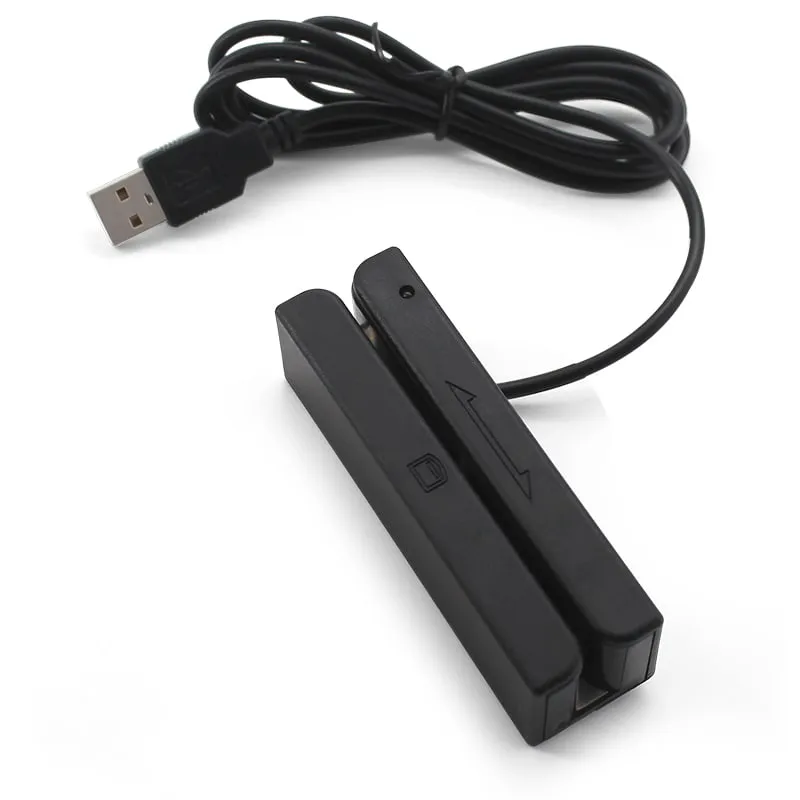
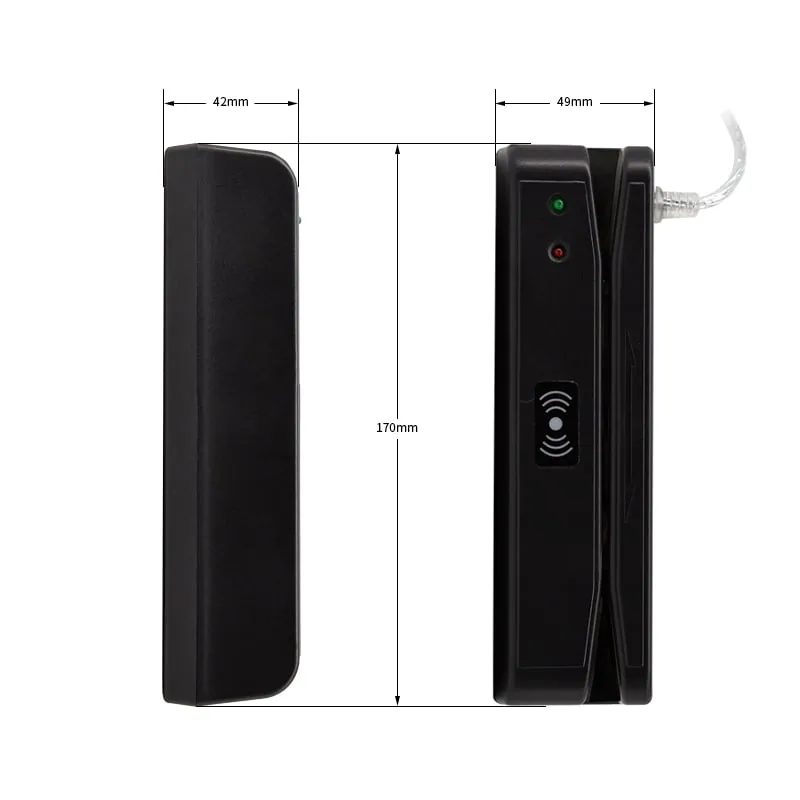
If your software only looks up a number, a Track 2 reader such as the M180-U USB Track 2 magnetic stripe reader is enough.
Track 3: rarely used, often empty
Track 3 was designed as a read/write track that the issuer could update at a terminal. In practice most cards leave it empty. Some ID, transit and closed-loop card systems store their own data there. A 3-track reader lets you check whether yours do.
What a keyboard-output reader types
A USB keyboard-emulation reader (keyboard wedge) turns each swipe into keystrokes at the cursor, so a membership form, spreadsheet or POS field receives the data without a driver. With a Track 2 number and sentinels switched on, a swipe typically arrives as:
;0012345678?With sentinels off, only 0012345678 arrives, followed by Enter if that suffix is enabled. A 3-track reader set to send all tracks types them one after another, typically starting with Track 1’s % and ending with the last ?.
Three things to test before rollout:
- Sentinels. Keep them if your software parses raw track data. Strip them if the field expects only the number.
- Keyboard layout. The reader sends key codes, not characters. On a French AZERTY layout, for example, the unshifted top-row keys produce symbols, so the digits
0012arrive asàà&é. Set the PC’s input language to English (US), or test on the target PC. - Track selection. Send only the track you need. On the M170-U USB 3-track magstripe reader, a PC setting utility chooses one track, any two or all three, and switches the sentinels, the Enter suffix and the beeper on or off.
RFID readers use the same keyboard-output method. What is a keyboard-wedge reader? explains it in more detail, and reading card numbers into Excel shows a typical no-code setup.
HiCo vs LoCo: coercivity explained
Coercivity is the strength of magnetic field needed to change the data recorded on a stripe. It is measured in oersteds (Oe).
| Feature | LoCo (low coercivity) | HiCo (high coercivity) |
|---|---|---|
| Typical coercivity | About 300 Oe | About 2,750 Oe (4,000 Oe also used) |
| Standard | ISO/IEC 7811-2 | ISO/IEC 7811-6 |
| Usual stripe color | Brown | Black |
| Resistance to accidental erasure | Low: a strong magnet close by can erase it | High |
| Energy needed to encode | Low | High |
| Card cost | Lower | Higher |
| Typical uses | Hotel keys re-encoded for each stay, short-term passes, event tickets | ID, gift, loyalty and membership cards meant to last for years |
Stripe color is a hint, not a test: colored and silver stripes exist in both types.
For reading, coercivity matters much less than for encoding. A read head senses flux transitions, and both HiCo and LoCo stripes produce them. The difference is how easily the data can be erased or rewritten. Our reader specifications do not list coercivity separately, so if your program uses HiCo cards, send a few samples and we confirm reading before you order.
If cards “stop working” after a few weeks, suspect erasure rather than the reader. LoCo stripes kept near magnetic phone-case clasps, bag clasps or magnetic door holders are the usual victims. Ordering the next batch of cards as HiCo usually solves it. Test a few HiCo samples on your reader before the full card order.
Payment cards are a separate matter
ISO/IEC 7813 also defines how payment cards use Tracks 1 and 2. Accepting card payments requires certified payment terminals and compliance with the PCI Data Security Standard, which restricts the storage of track data. Our magnetic stripe readers are desktop readers for membership, loyalty, hotel, ID and attendance cards, not payment terminals, and they are read-only: they do not write or encode stripes.
How to choose a magnetic stripe reader
Checklist:
- Find out which tracks are encoded. Swipe a sample card on a 3-track reader with all tracks enabled into a text editor, or send us sample cards to check.
- Match the tracks your software reads. For a Track 2 number only, a Track 2 reader is enough. For a name from Track 1, or data on Track 3, you need a 3-track reader.
- Confirm the output. Decide whether the field needs sentinels and an Enter after each swipe.
- Check swipe speed and volume. The M170-U is rated for 15–120 cm/s, so an 85.6 mm card passes the head in 0.07–0.57 s. Rated head life is ≥ 800,000 passes on the M170-U and 600,000 on the M180-U, roughly 1,600 and 1,200 days at 500 swipes a day.
- Check the cards. Both models take cards on 0.76 ± 0.08 mm PVC. Include older, worn cards in your sample test.
| Feature | M170-U | M180-U |
|---|---|---|
| Tracks | 1, 2 and 3; one, two or all three sent | Track 2 only |
| Output | USB keyboard emulation, driver-free; sentinels, Enter and beeper configurable | USB; output configuration confirmed in your quotation |
| Swipe | Bi-directional, 15–120 cm/s | Bi-directional, up to 120 cm/s |
| Rated head life | ≥ 800,000 passes | 600,000 passes |
| Size and weight | 91.4 × 27.6 × 28.2 mm, 80 g | 170 × 42 × 49 mm, 167.2 g |
| Power | 5 V USB, ≤ 50 mA | 5 V USB, ≤ 35 mA |
Both are listed on the USB magnetic stripe card readers page. Before a volume order, order a sample reader and test it with your own cards and software. Tell us which tracks your software reads and whether it expects sentinels and an Enter after each swipe: the M170-U sample ships set up that way, and M180-U output settings are confirmed in your quotation.
Moving from stripe to contactless
Stripes wear, can be erased and need a swipe slot. If you are planning a new card issue, contactless cards avoid all three. The simplest migration leaves your software unchanged: a keyboard-emulation RFID reader types a card number into the same field a stripe reader used. 125 kHz vs 13.56 MHz explains which card type fits, and the H110-U 13.56MHz USB MIFARE reader is a USB desk reader that types the UID of MIFARE Classic cards. Cards that carry both a stripe and an RFID chip let old and new readers work side by side during the changeover.
Frequently asked questions
What is stored on Track 1, 2 and 3 of a magnetic stripe card?
Track 1 holds up to 79 characters of letters and digits, so it is where a cardholder name appears. Track 2 holds up to 40 digits and usually carries the card, member or staff number. Track 3 holds up to 107 digits of issuer-defined data and is empty on many cards. The exact layout is set by the card issuer.
Do I need a 3-track magnetic stripe reader?
Only if your software reads Track 1 or Track 3. Many membership, loyalty and staff ID systems look up just the Track 2 number, which a Track 2 reader such as the M180-U covers. If you need the name from Track 1, choose the 3-track M170-U.
Can a magnetic stripe reader read both HiCo and LoCo cards?
Usually, yes. Coercivity matters mainly when a stripe is encoded or erased; a read head senses flux transitions, and HiCo and LoCo stripes both produce them. Our reader specifications do not list coercivity, so if your program uses HiCo cards, send a few samples and we will confirm they read before you order.
Why does my swipe output start with a semicolon and end with a question mark?
Those are the start and end sentinels that frame Track 2 data: ; before the digits and ? after them. Track 1 starts with % instead. Keep them if your software parses raw track data; on the M170-U you can switch them off so only the number is typed.
Can your magnetic stripe readers write or encode cards?
No. The M170-U and M180-U are read-only. They decode the stripe and send the data to the PC; they cannot write, encode or copy a stripe. New cards should be encoded by your card supplier.
Readers mentioned in this guide
 Magstripe
  Magstripe
  13.56MHz
 H110-U
13.56MHz USB NFC / MIFARE Card Reader, Slim Pad, No Driver
- USB
- Desktop
Read range: Up to 80 mm